
Quick answer
Choose a link-in-bio page for menus. Choose ForceLink for app opens.
A Linktree-style page is great when you want one public profile page with several buttons. ForceLink is different: it focuses on the click after the tap. It helps your Instagram, TikTok, YouTube, Spotify, store, booking, or product links open in the right place instead of getting trapped in a browser page. The two tools answer different questions. A bio page answers where do I send people who do not yet know what they want. A smart link answers how do I make sure the person who already knows arrives there smoothly.
The simple version
If people already know what they want to tap, do not make them stop at another menu. Send them directly to the app, track the result, and keep the journey short.
The real difference is what happens after the tap
Most link-in-bio tools solve the same basic problem: social platforms only give you one clickable bio link, so these tools hand you a small landing page with many buttons. That is genuinely useful for creators, restaurants, brands, and local businesses that need a public menu of destinations in one tidy place. If a visitor does not yet know whether they want your newest video, your shop, or your booking page, a menu lets them choose.
But a large share of your clicks do not need a menu at all. They need a direct path. If someone taps a link for a specific YouTube video, a Spotify track, an Instagram profile, a TikTok post, or a single product, the best experience is almost never another page full of choices. It is the right app opening as quickly as possible, with the person already signed in and one tap away from the action you wanted.
This is the distinction that gets blurred when people ask for a Linktree alternative. They often do not actually want a different menu page. They want the clicks leaving that page, or leaving their stories and ads, to stop dying in a browser. That is a routing job, not a menu job, and it is exactly the job a smart link is built to do.
Plain English
A link-in-bio page organizes links. A smart link routes clicks. The first decides what people can choose; the second decides how smoothly they arrive.
How a link-in-bio page actually works, and where it leaks
To see where the leaks happen, it helps to trace a normal bio-page journey. A follower taps your bio link inside Instagram. The in-app browser opens and loads your menu page. They scan the buttons, find the one they want, and tap again. That second tap loads the destination, still usually inside the same in-app browser. Only then do they try to do the thing they came for, whether that is following, listening, watching, or buying.
Every one of those steps is a place where real people fall away. Some never find the right button on a busy menu. Some tap the destination and land logged out, because the in-app browser does not share their app login. Some lose patience waiting for a second or third page to load. The menu page did its job of organizing, but the journey was longer than it needed to be, and length is the enemy of conversion on mobile.
A smart link collapses that journey. For a high-intent click, where the person already knows what they want, the smart link skips the menu entirely and routes straight to the destination, opening the native app when it can. You keep the menu page for genuine discovery, and you use direct smart links for the moments where a menu only adds distance.

When a Linktree-style page is genuinely enough
It would be unfair to suggest menu pages are obsolete. They are the right tool in plenty of situations, and pretending otherwise would lead you to overcomplicate something simple. A menu page shines when discovery matters more than direct routing, and when your audience arrives without a single obvious next step in mind.
Not a competition
If discovery is the goal, keep the menu. The mistake is using a menu for clicks that already have a clear destination, where it only adds a step.
- You want one public page that gathers your most important links in a place that is easy to share.
- You need a simple creator profile that you can update in seconds without touching anything technical.
- Your visitors genuinely benefit from choosing between several options rather than being sent to one.
- You are running a broad brand presence where the goal is orientation, not a single conversion.
- You want a lightweight hub that you can point to from many platforms with one memorable address.
When a smart link alternative makes more sense
Smart links make more sense the moment the visitor has already chosen an action. Maybe they scanned a QR code that clearly promised a Spotify playlist. Maybe they tapped a story link specifically to watch a new Reel. Maybe they clicked an ad for one particular product. In all of those moments, the person has signalled intent, and dropping them on a menu asks them to make a choice they already made.
For those clicks, ForceLink helps you create clean links that try to open the right app first and then fall back to a sensible browser path only if the app cannot open. The result is a journey that matches the intent: high-intent clicks go straight through, while you reserve the menu for the genuinely undecided. You stop treating every visitor as if they need to be re-sold on where to go.
Shorter journey
Skip unnecessary landing pages when the destination is already clear, so interested people arrive before they lose momentum.
Better mobile experience
Give app-based clicks the best chance of opening where people are already logged in, instead of a logged-out web view.
Cleaner analytics
See which links drive real clicks toward an action, not just visits to a menu page that may go nowhere.
Consistent across channels
Use the same direct link in stories, DMs, QR codes, ads, and email, so every channel behaves the same way.
Why it is not an either-or decision
The most effective setup for most creators is not choosing one tool and abandoning the other. It is using each where it is strongest. Think of your menu page as the front door of a shop and your smart links as the express lanes. The front door welcomes anyone who is browsing. The express lanes serve the people who already know exactly what they came for.
In practice, that means your main Instagram bio can stay a menu, while the link you drop in a story about a specific product is a direct smart link. The QR code on your packaging that promises a setup video is a direct smart link. The link in your email about a new single is a direct smart link. Each high-intent moment gets a direct route, and the menu quietly handles everyone who is still deciding.
Combining them also gives you a clearer picture of behavior. Your menu page tells you what undecided visitors explore, while your smart links tell you how well your high-intent campaigns convert. Read together, those two signals are far more useful than a single page trying to do both jobs at once.
Examples of links that should open straight in apps
Instagram profile or Reel
Send people into the Instagram app instead of a browser page where they may be logged out and following takes extra taps.
TikTok video or profile
Make mobile clicks feel natural for viewers who already use TikTok, so they watch and follow without a detour.
YouTube video or channel
Give the YouTube app the first chance to open, especially from social posts, SMS, and QR campaigns where the web player is a weaker experience.
Spotify track, album, or playlist
Help music, podcast, and playlist links open where listening actually happens, so a curious tap becomes a real stream.
Store or product page
Open the shopping app for returning customers who are already signed in, removing the logged-out checkout friction that kills mobile sales.
How to use ForceLink alongside your link-in-bio page
You do not need to delete your existing link-in-bio page to get the benefit of app-aware routing. Many creators keep a menu page for general discovery and layer smart links on top for high-intent campaigns. The switch is additive, not destructive, which makes it low risk to try.
A simple way to roll it out is to leave your main bio as a menu, then upgrade the links that carry the most intent. Story links, QR codes, DMs, ads, email campaigns, and product drops are the obvious first candidates, because those are the moments where a person already knows what they want and a menu only slows them down.
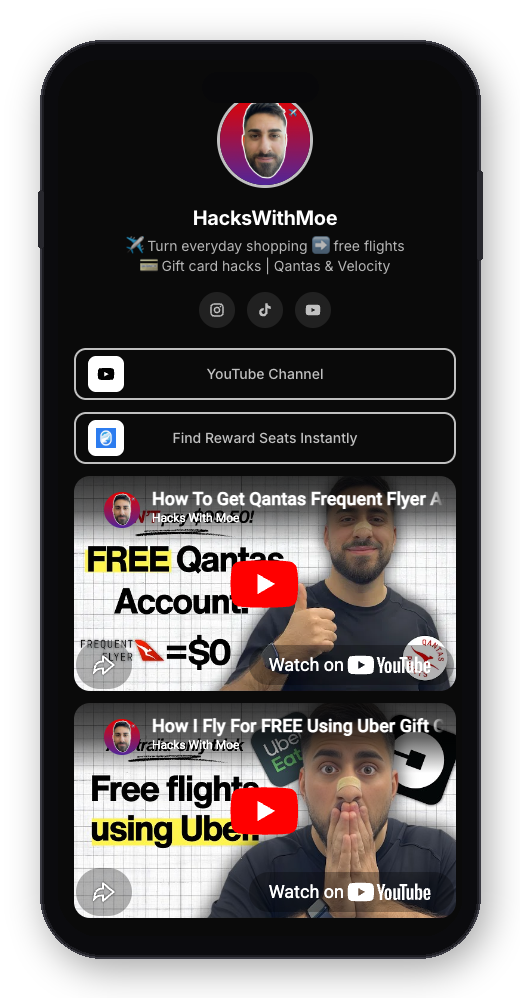
Keep your menu as the front door
Leave your existing bio page in place for broad discovery and brand presence. Nothing breaks, and nobody loses access to anything.
Make direct smart links for campaigns
For each specific promotion, create one smart link to its exact destination and use it wherever that campaign appears.
Optionally rebuild menu buttons as smart links
If you want the best of both, point the buttons on your menu page at smart links so each option also opens in the right app.
Compare and adjust
Watch which direct links outperform the equivalent menu route, and shift more of your high-intent traffic to direct links over time.
What better analytics looks like once you switch
One of the quietest costs of a menu-only setup is that your data blends two very different things: people exploring and people converting. When every click lands on the same page first, your numbers tell you how many visits the page got, but not how cleanly anyone reached the destination. That makes it hard to know whether a campaign worked or simply attracted curious taps.
With direct smart links, each campaign gets its own clean signal. You can see clicks over time, the device and operating system split, and where the traffic came from, all tied to a single destination rather than a shared menu. When a link gets many taps but few of the actions you care about, you have a specific, fixable clue instead of a vague sense that something is underperforming.
Over a few weeks, that clarity compounds. You learn which placements deserve more attention, which destinations convert best from which channels, and where routing problems are quietly costing you. None of that requires more content. It comes from measuring the journey you already send people on, more precisely.
Moving away from a menu without losing your audience
If you are considering replacing a menu page entirely, the main risk is not technical. It is continuity. Your audience may have your old link saved, printed, or embedded in places you have forgotten. The goal of a careful migration is to make sure no one hits a dead end while you transition.
The safest path is to move gradually. Start by adding smart links for new campaigns while your menu page keeps working. As you grow comfortable, rebuild the menu's most important buttons as smart links so the routing improves without changing what visitors see. Only once your direct links are carrying the bulk of your high-intent traffic should you consider retiring anything, and even then it is wise to keep a simple fallback page alive.
Throughout, keep one principle in mind: never let an old link lead nowhere. A link you control should always resolve to something useful, even if the destination has changed. That way a follower who saved your link a year ago still arrives somewhere sensible today, which protects the trust you spent so long building.
Common mistakes when replacing Linktree
Forcing every click through a menu
Sending high-intent clicks to a menu adds a step they do not need. Match the path to the intent: direct for decided, menu for browsing.
Sharing raw destination URLs
If you bypass the menu but paste a raw URL, you are back to letting the in-app browser decide. Use a smart link so the routing is intentional.
Letting old links die
Retiring a page without a fallback strands everyone who saved the old link. Always keep a sensible destination alive.
Not measuring the change
If you switch without watching the numbers, you cannot prove the improvement or spot a placement that needs fixing. Track before and after.
Menu page versus smart link, side by side
It is worth slowing down and comparing the two approaches directly, because the right choice depends entirely on the moment, not on which tool is better in the abstract. A menu page and a smart link are not competing for the same job. They are answering different questions, and the clearest way to see that is to walk through the same visitor in both setups.
Picture a follower who just watched your story about a new product and taps your link. In a menu-only setup, they land on your bio page, scan a list of buttons, hunt for the one that matches the product they just saw, tap it, wait for a second page, and only then reach the store, often logged out. Three actions and two page loads stand between intent and arrival, and each one sheds a few people who were genuinely ready to buy.
Now picture the same follower with a direct smart link in that story. They tap once, the shopping app opens to the product, and they are already signed in. One action, no menu, no logged-out web view. The content that earned the tap was identical in both cases. The only thing that changed was the distance between the tap and the result, and that distance is exactly what you control when you choose the right tool for the moment.
The lesson is not that menus are bad. It is that distance is expensive. Use a menu when the visitor needs to choose, because then the menu is the shortest honest path. Use a direct smart link when the choice is already made, because then the menu is just a toll booth on the way to where they were always going.
A worked example for a typical creator week
To make this concrete, imagine a creator who posts a few times a week across Instagram and TikTok, sells a digital product, and sends an occasional email. In a menu-only world, almost every promotion ends with the same instruction: tap the link in my bio. That single overloaded link has to serve the new video, the product, the newsletter, and the back catalogue all at once, and the menu it leads to grows longer every month.
The problem is that the menu cannot tell why any particular visitor arrived. Someone who came for the new product sees the same wall of buttons as someone who came for a free guide. The creator, meanwhile, sees a pile of clicks to one page and very little sense of which campaign actually drove a sale. The data is blurry precisely because every path runs through the same door.
Switching the high-intent moments to direct smart links changes the week without adding a single post. The product promotion gets its own link straight to checkout. The newsletter signup gets its own link straight to the form. The new video gets its own link straight into the app. The bio menu stays for casual browsers, but the campaigns that matter now have clean, separate routes, and the creator can finally see which one earned which result.
By the end of a month, that creator is not working harder. They are simply losing fewer of the people who already wanted what they offered, and they understand their own funnel well enough to put more energy where it pays off. That is the quiet compounding advantage of matching the path to the intent.
A quick checklist before you publish a link
Before you post any link, it helps to run a short mental checklist so the routing decision is deliberate rather than accidental. None of these checks take more than a few seconds, and together they prevent the most common ways clicks leak away on their journey from your post to your goal.
First, ask whether this visitor has already decided. If yes, reach for a direct smart link; if no, a menu is fair. Second, confirm you are sharing a smart link and not a raw URL that slipped back in. Third, decide where the click should land if the app cannot open, and make sure that fallback page is fast and relevant. Fourth, test the link on a real phone from inside the app you will post it in, not just on your desktop. Fifth, give the link a clear purpose so that when you review your numbers later, you know exactly which campaign it represents.
Run that checklist a few times and it becomes automatic. The creators who consistently convert are rarely doing anything dramatic. They have simply made good routing a habit, so that every link they publish quietly works the first time, on the first tap, for the largest possible share of the audience they worked to earn.
How this scales as your audience and catalogue grow
What feels like a small convenience at a few thousand followers becomes a real structural advantage as you grow. Early on, one bio link and a short menu are easy to manage because you only promote a handful of things. But audiences and catalogues expand. Soon you have several products, a back catalogue of videos, multiple platforms, seasonal campaigns, and collaborations, and the single overloaded menu that once felt tidy starts to feel like a filing cabinet nobody wants to open.
Direct smart links scale gracefully because each one carries a single, clear job. When you launch something new, it gets its own link with its own purpose and its own numbers. You are not cramming another button onto an ever-growing list or hoping visitors find the right row. Each campaign stands on its own, which keeps both the visitor experience and your reporting clean no matter how much you are promoting at once.
There is also a durability benefit that matters more over time. Because you control the smart link, you can repoint it whenever a destination changes. A link printed on packaging, embedded in an old video description, or saved by a loyal follower keeps working even after the underlying product, profile, or campaign moves. You are building a small, reliable layer of permanent addresses that you own, rather than scattering disposable URLs you will never be able to update.
For teams and collaborators, that ownership compounds again. A consistent set of smart links means anyone helping you can reuse the right link without guessing, and everyone reads the same numbers. Instead of a tangle of one-off URLs spread across notes, captions, and ad accounts, you have a tidy, measurable system that grows with you rather than against you.
None of this requires you to become more technical. It simply means treating your most important links as assets worth keeping rather than throwaway strings. The earlier you adopt that mindset, the less untangling you will face later, and the more of your hard-won attention will reliably convert as you scale.
Putting it all together
The phrase Linktree alternative usually hides a more precise wish: stop losing the clicks I already earned. A menu page is a fine tool for helping undecided visitors choose, and there is no need to abandon one that works. But the clicks that matter most, the ones from people who already decided to act, deserve a direct route into the right app rather than a detour through a menu and a logged-out web view.
Smart links give you that route without forcing an all-or-nothing decision. Keep your menu for discovery, add direct smart links for intent, measure both, and migrate at a pace that never strands your audience. Done that way, you get the organization of a bio page and the conversion of app-aware routing at the same time.
Start with your highest-intent campaign this week, give it a direct smart link, and compare it against the menu route you used before. The gap you see is the audience you were quietly losing, and it is the easiest growth you will find without making anything new.
Try it before you sign up
Create a temporary smart link.
Test ForceLink with one demo link. It is limited to 3 clicks so you can see the app-opening flow before creating an account.
FAQ
Is ForceLink a Linktree replacement?
It can be, but it does not have to be. Link-in-bio pages are useful for menus. ForceLink is strongest when you need individual links to open in the right app and track the result, and it works happily alongside a menu page you already have.
Can I use ForceLink with my existing bio page?
Yes. You can keep a bio page for general navigation and use ForceLink for direct links in stories, DMs, QR codes, email, ads, and campaigns. Many creators even rebuild their menu buttons as smart links so every option also opens in the right app.
Does ForceLink guarantee every app will open?
No link tool can guarantee that on every device, because operating systems, browsers, and social apps all control part of the flow. ForceLink gives each click the best available route and provides a clean fallback when the native app cannot open.
Will I lose my audience if I move away from a menu page?
Not if you migrate gradually and never let an old link lead to a dead end. Add smart links for new campaigns first, rebuild important buttons over time, and keep a sensible fallback alive so saved or printed links still work.
Do smart links work for music and podcast promotion?
Yes, this is one of their best uses. A single smart link can open a track, album, or playlist directly in a listener's preferred app, which turns far more curious taps into real plays than a web page that asks people to choose a service.
Can I still collect everything in one place to share?
Absolutely. You can keep one shareable hub for discovery and simply make its links smart, so the convenience of a single address and the smoothness of app opens are not mutually exclusive.
Who should use a smart link alternative?
Creators, agencies, ecommerce brands, restaurants, musicians, podcasters, coaches, and local businesses that care about mobile clicks opening in the right place and want clean numbers for each campaign.
How quickly can I set this up?
Creating a smart link takes a minute, and you can keep your existing bio page exactly as it is. Most creators start by upgrading just their highest-intent campaign and expand from there once they see the difference.
Will a smart link change how my bio looks to visitors?
Not unless you want it to. You can keep your current bio page and its design exactly as it is. Smart links work behind the buttons and behind your campaign links, so visitors see the same page while the clicks underneath route more reliably into the right apps.
Can I track which platform a click came from?
Yes. Because each smart link records clicks along with context like device, operating system, and referrer, you can see how your Instagram, TikTok, email, and QR traffic each behave, rather than blending everything into one anonymous total on a menu page.