
Quick answer
Use a smart link, not a plain URL.
A plain Instagram link often opens wherever the phone decides: Safari, Chrome, an in-app browser, or sometimes the Instagram app. A smart link gives the click clearer instructions. It tries to open the correct app first, then sends the person to a useful backup page if the app cannot open. That single change removes a surprising amount of friction, because most of the clicks you lose are not lost to lack of interest. They are lost to a confusing landing experience that asks people to log in again, copy a link, or hunt for a button.
The simple version
ForceLink helps one link work across Instagram bios, stories, DMs, ads, QR codes, and email campaigns so more people land where you meant to send them.
Why Instagram links open in browser pages
Phones do not treat every link the same. When someone taps a link, the operating system has to make a fast decision about which piece of software should handle it. Sometimes that decision lands on the right app. Often it does not. A link may open in a browser because the app is not installed, because the app does not claim that exact web address, because the link was wrapped or rewritten by another platform, or because the person clicked from inside a social media browser that is designed to keep them inside its own app.
That last reason is the one that surprises most creators. When someone taps a link in your Instagram bio, the tap does not happen in Safari or Chrome. It happens inside Instagram's own built-in browser, a small web view that lives inside the Instagram app. That web view is intentionally limited. It does not always hand off cleanly to other apps, it does not always share the login session you have in the real app, and it can quietly strip away the signals that would normally tell the phone to open a native app instead.
This is why a link can work perfectly for one person and feel broken for another. The path a click takes changes depending on the device, the operating system version, the browser, the country, the app that originated the tap, and the exact format of the link itself. You are not imagining the inconsistency. The same URL genuinely behaves differently for different people, and you usually never hear about the ones who gave up.
The simple version
The click needs routing instructions. Without them, the phone guesses, and the in-app browser usually wins. ForceLink gives the click a better, more reliable path.
What actually happens when someone taps your link
It helps to slow down and look at the journey one tap takes, because the problem hides in the details. Imagine a follower reading your Instagram bio on their phone. They see your link, they are interested, and they tap. In that instant, Instagram opens its in-app browser and starts loading the web address you pasted. If that address is a normal web page, the follower is now sitting in a stripped-down browser inside Instagram, not in the app or store page you actually wanted them to reach.
From there, a few things can go wrong. The page might try to bounce them into another app, which the in-app browser may block or mishandle. The page might load a website that asks them to log in, even though they are already logged in inside the real app. Or the page might simply load slowly, and the follower taps away before it finishes. None of these failures look dramatic. There is no error message. The person just quietly does not arrive where you intended, and you see a click that never turned into a follow, a sale, or a stream.
A smart link changes the first decision in that chain. Instead of handing the in-app browser a plain web page and hoping for the best, it hands over a set of instructions: try to open this in the correct native app first, and only fall back to a web page if the app genuinely cannot open. That tiny shift at the start of the journey is what turns a frustrating, inconsistent experience into a smooth one for far more of the people who tap.

Why this loses clicks, follows, and sales
The problem is not just technical. It is a conversion problem, and conversion is where your time and money actually turn into results. If a person lands in a browser page instead of the right app, they may need to log in again, tap another button, wait for a slow page to load, or work out what to do next. Every extra step gives them a reason to leave, and on mobile, where attention is measured in seconds, many of them will.
It also distorts the numbers you use to make decisions. When routing is poor, a campaign can look like it failed when it actually succeeded at the hard part. People were interested enough to tap. They simply did not make it through the last few feet of the journey. If you judge that campaign by follows or sales alone, you might wrongly conclude the content was weak or the audience was cold, when the real issue was a link that dropped people into the wrong place.
Logged-out visitors do less
If the person is not signed in, they are less likely to follow, save, subscribe, buy, or message you. The in-app browser rarely carries your real login session, so people who are signed in everywhere else suddenly appear logged out.
Extra taps lower conversion
Every extra tap makes the journey feel slower, especially on mobile where attention is already short. Each step from tap to goal is a place where a real, interested person quietly drops off.
Browser pages hide intent
A click that lands in the wrong place can look like weak interest when the real issue was poor routing. Bad data leads to bad decisions about content, budget, and audience.
Deep links, universal links, and app links in plain English
You do not need to be an engineer to fix this, but a little vocabulary helps you understand why it works. A deep link is a link that points to a specific place inside an app rather than to a general web page. Instead of opening a website about a song, a deep link opens that exact song inside the music app. The promise of a deep link is that the person arrives already in context, signed in, and ready to act.
On Apple devices, the modern version of this idea is called a universal link. On Android, the equivalent is called an app link. Both let a normal-looking web address open directly inside an app when the app is installed and everything is configured correctly. The catch is that getting them to fire reliably depends on many moving parts that you do not control: the destination platform, the operating system, the browser, and whether the click started inside another app's web view.
This is the gap a smart link fills. A smart link is a single short link that wraps all of this complexity for you. When someone taps it, it reads the context of the click and chooses the best available path: open the native app where it can, and fall back to a clean web page where it cannot. You get the benefit of deep linking without having to manage the underlying technical details for every platform and device yourself.
Honest expectation
No tool can guarantee a native app open on every phone, every time. Apple, Android, browsers, and social apps each control part of the flow. The realistic goal is to win far more of the openable cases and to fail gracefully on the rest.
How to make Instagram links open in the app
The good news is that the fix is short and does not require touching your website code or asking your followers to do anything differently. You replace the plain link in your bio, story, or DM with one smart link, and you let that link handle the routing decision on every tap. Here is the full process from start to finish.
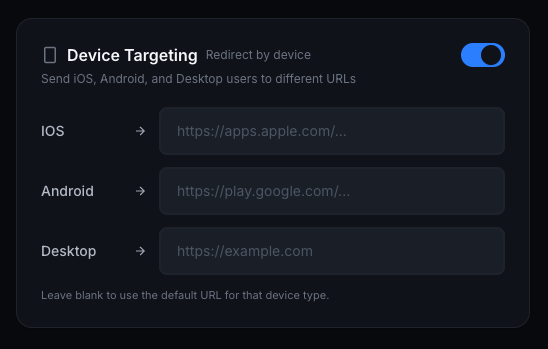
Paste the destination link
Start with the real link you want people to open, such as an Instagram profile, a Reel, a YouTube video, a Spotify track, a TikTok post, or a product page. This is the place you actually want the click to end up.
Create one smart short link
ForceLink turns that destination into one clean link you can share in your Instagram bio, story, DM, QR code, ad, or email. You only manage one link, even if you reuse it in many places.
Let the link choose the best path
When someone taps, the link checks the device and the click context, then tries to open the right app. If the app cannot open, it falls back to a useful browser page instead of leaving the person stuck on a blank or broken screen.
Add a clean fallback page
Decide where people should land if the app cannot open. A fast, relevant web page is far better than a dead end, and it keeps people moving toward the action you want.
Track what happened
Watch clicks, devices, locations, and referrers so you can see which links are actually moving people forward, and which placements deserve more of your attention.
Real situations where routing decides the outcome
Routing sounds abstract until you map it onto the things you do every week. Consider these everyday moments where a smart link quietly does the heavy lifting and a plain link quietly loses people.
- A musician shares a new single in their Instagram story. A plain link opens a web page about the song, where the listener has to choose a service and log in. A smart link opens the track directly inside the listener's preferred music app, ready to play.
- A small brand runs a paid ad to a product page. With a plain link, shoppers land in the in-app browser, logged out of the store, and abandon the cart. With a smart link, returning customers open the store inside the shopping app where they are already signed in.
- A creator drops a profile link in a DM to grow follows. A plain link can open a logged-out web profile where following takes extra taps. A smart link opens the profile inside the app, where one tap follows.
- A restaurant prints a QR code on a table tent. A plain link opens a slow web menu. A smart link opens the booking or ordering app directly, so a curious guest becomes a booking instead of a closed tab.
Common mistakes that keep links stuck in the browser
Most broken-feeling links are not caused by anything exotic. They are caused by a handful of avoidable habits. If your links keep dumping people into a browser, look for these patterns first.
Sharing raw, unwrapped URLs
A raw web address has no routing instructions attached. It is entirely at the mercy of whatever in-app browser handles the tap, which is exactly the situation you want to avoid.
Assuming desktop behavior matches mobile
A link that opens perfectly on your laptop tells you almost nothing about how it behaves inside Instagram on a stranger's phone. Always test from mobile, inside the app.
Ignoring the fallback page
If you never decide where people go when the app cannot open, the default fallback is often a confusing or irrelevant page. A good fallback is part of the fix, not an afterthought.
Using a different link in every place
Scattering many one-off links makes it impossible to see what works and slow to fix problems. One smart link reused everywhere is easier to manage and measure.
Where smart Instagram links help most
Smart links are useful anywhere the person is likely to click from a phone, which today is almost everywhere. That includes Instagram stories, profile bios, DMs, and captions, but it extends well beyond Instagram. The same single link can carry TikTok bios, YouTube descriptions, Spotify promos, QR codes on packaging and posters, paid ads across networks, email campaigns, and SMS campaigns.
Because one smart link works across all of these surfaces, you also get a consistent experience for your audience and a consistent set of numbers for yourself. Someone who finds you on TikTok and someone who finds you in an email both pass through the same well-routed door, and you can see how each channel performs without juggling a dozen separate links.
The goal is simple: one link that removes confusion and gets the person to the app, page, video, song, profile, or checkout you actually wanted them to see. When the door opens smoothly, more of your existing audience converts, without you creating a single new piece of content.
How to know whether it is actually working
Once your links route properly, the last step is to confirm the improvement with evidence rather than a hunch. Start by testing the link yourself on more than one device, because your own phone is only one of the many contexts your audience uses. Tap it on an iPhone and on an Android, from inside Instagram, from a normal browser, and from a different app such as Messages. Watching the link behave in each context shows you exactly what your followers experience.
Then let real traffic tell the story. Look at clicks over time, the split between devices and operating systems, and where the clicks are coming from. If a placement gets many clicks but few of the actions you care about, that is a clue worth chasing. If app-aware routing is doing its job, you should see steadier results across devices and fewer of the silent drop-offs that used to hide inside your totals.
Treat this as an ongoing habit, not a one-time setup. Platforms change their in-app browsers, your audience mix shifts, and new campaigns introduce new placements. A quick monthly check that your most important links still open cleanly will protect the conversions you worked hard to earn.
Platform-by-platform notes worth knowing
Instagram is the most common place creators notice this problem, but every platform handles links a little differently, and understanding the differences helps you set the right expectations. The pattern to remember is that the app where the click starts matters just as much as the app where you want it to end.
On Instagram, almost every tap from a bio, story, or DM begins inside the in-app browser. That makes app-aware routing especially valuable here, because the default behavior leans hard toward keeping people in the web view. On TikTok, the in-app browser behaves similarly, and link space is limited, so one reliable smart link is easier to manage than several raw URLs. On YouTube, description links often open in the system browser rather than a tightly sandboxed web view, which can behave better, but routing still decides whether a music or store link lands in the right app.
Email and SMS are different again. A tap from an email client or a text message usually opens in the system browser, which tends to hand off to native apps more willingly than a social in-app browser does. Even there, though, a smart link earns its place by sending returning customers straight into the app where they are already signed in, and by giving you one set of numbers across every channel instead of a scattered pile of one-off links.
A simple weekly workflow for creators
You do not need a complicated system to keep your links healthy. A light, repeatable routine is enough to capture most of the benefit and catch problems before they cost you a campaign. The aim is to make good routing the default for everything you publish, without adding meaningful work to your week.
Create one smart link per destination
When you have something to promote, make a single smart link for it and reuse that one link everywhere: bio, stories, DMs, captions, and any ads. Resist the urge to paste raw URLs in a hurry.
Test it on two phones before you post
Open the link on an iPhone and an Android, from inside the social app, before it goes live. Thirty seconds of testing prevents a week of silently lost clicks.
Check your numbers once a week
Spend a few minutes reviewing clicks by placement and device. Look for any link that gets taps but few of the actions you care about, and treat it as a routing problem first.
Refresh the destination, keep the link
When a promotion ends, point the same smart link at the next thing instead of minting a new URL. Your audience keeps a link that always works, and your history stays in one place.
What to do if a link still opens in the browser
Sometimes a link still lands in the web view even after you switch to a smart link, and that is usually a sign of one specific, fixable cause rather than a dead end. Work through the likely reasons in order before assuming anything is broken.
First, confirm the person actually has the destination app installed. If they do not, the fallback web page is the correct and intended behavior, not a failure. Second, remember that some in-app browsers are stricter than others, and a small number will refuse to hand off no matter what; in those cases the clean fallback page is what protects the click. Third, check that you are sharing the smart link itself and not an older raw URL that slipped back into a caption or a saved note.
If a particular placement keeps underperforming, isolate it. Use a smart link that you only share in that one spot, then compare its behavior against the same destination shared elsewhere. That quick comparison almost always reveals whether the issue is the placement, the device mix, or the destination itself, and it turns a vague feeling that something is off into a specific thing you can fix.
Remember
A fallback to a clean web page is a feature, not a failure. The worst outcome is a dead end. The goal is that every tap reaches a useful place, in the app when possible and on the web when not.
Putting it all together
If you take one idea away from this guide, let it be this: the gap between a tap and a result is mostly an engineering problem dressed up as a marketing problem, and you can close most of it without making a single new piece of content. The people tapping your links have already done the hard part. They saw your post, they trusted you enough to act, and they reached for their phone. Everything after that tap is logistics, and logistics are fixable.
A plain URL leaves those logistics to chance. It drops your most interested audience into whichever in-app browser happens to catch the tap, logs many of them out, and asks them to find their own way to the app, the song, the profile, or the checkout. A smart link replaces that chance with a decision. It reads the context, opens the right app when it can, and lands on a clean web page when it cannot, so the click is never simply wasted.
Practically, that means choosing one link for each destination, reusing it everywhere you appear, testing it on real phones, and watching the numbers to confirm it is doing its job. None of those steps are difficult, and together they recover conversions you are currently losing in silence. The creators who win at this are rarely the ones posting the most. They are the ones whose links quietly work every time, so that interest reliably turns into action.
Start with your single most important link, the one in your Instagram bio, and fix that one first. Once you see steadier results from the audience you already have, rolling the same approach out across your stories, DMs, ads, and emails becomes an easy decision rather than a leap of faith.
Try it before you sign up
Create a temporary smart link.
Test ForceLink with one demo link. It is limited to 3 clicks so you can see the app-opening flow before creating an account.
FAQ
Why do Instagram links open in a browser instead of the app?
A link can open in a browser when the phone, browser, social app, or destination website does not know which app should handle it. This is especially common inside social media in-app browsers, which are designed to keep people inside the social app rather than hand off cleanly to other apps.
Can I force every Instagram link to open in the Instagram app?
No tool can guarantee every app open on every phone, because Apple, Android, browsers, and social apps all control parts of the flow. A smart link gives each click the best available path and uses a clean fallback page when the app cannot open, so you win far more of the cases that are actually winnable.
Why is a normal short link not enough?
A normal short link usually just shortens a web address and sends people to a web page. That can mean the person is logged out, distracted, or asked to open the app manually. Smart links are built to route by device and app context, so they make a real decision about where the tap should go.
Does this work for TikTok, YouTube, and Spotify too?
Yes. The same approach applies anywhere people tap from a phone. One smart link can route to a TikTok post, a YouTube video, a Spotify track, a product page, or a profile, opening the matching app where possible and falling back to the web where not.
Will a smart link slow down the click?
A well-built smart link adds only a tiny, near-instant routing step. In practice it usually feels faster overall, because people skip the slow, logged-out web detour and arrive in the app ready to act.
What happens if someone does not have the app installed?
That is exactly what the fallback page is for. If the app cannot open, the smart link sends the person to a clean, relevant web page instead of leaving them on a broken screen, so the click is never wasted.
Where should creators use smart Instagram links?
Use them in Instagram bios, stories, DMs, captions, QR codes, ads, email campaigns, and anywhere people click from mobile. Reusing one smart link across placements also makes your results far easier to read.
Do I need to change my website or app to use smart links?
No. You do not touch your website code or your app. You create the smart link, share it in place of the raw URL, and the routing happens at the link level. That is what makes it practical for creators and small teams without developers.
How is a smart link different from a link-in-bio page?
A link-in-bio page is a menu of several links, useful when visitors need to choose between options. A smart link is about how a single destination opens. The two work well together: a bio page can be built from smart links so each option also opens in the right app.
How often should I check that my links still open correctly?
A quick monthly test is enough for most creators, plus a fast check whenever you launch a new campaign or notice a placement underperforming. Platforms update their in-app browsers over time, so an occasional check protects the conversions you already earn.