
Quick answer
Use Bitly-style short links for tidy URLs. Use ForceLink when the click needs smarter routing.
A standard short link is helpful when you want a cleaner URL and basic tracking. ForceLink is built for creators and businesses who need more than shortening: app opens, fallbacks, QR codes, and analytics that show what happens after the tap. The difference matters because shortening solves a cosmetic problem, while routing solves a conversion problem. A tidy link that still drops people into a logged-out browser has fixed how the link looks without fixing where it goes.
The simple version
The best link is not just short. It is easy to share, opens in the right place, and gives you enough data to improve the next campaign.
What short links are genuinely good at
It is worth being fair to the humble short link, because it does several things well and there is no reason to abandon those benefits. A short link takes a long, ugly web address full of tracking parameters and turns it into something tidy you can drop into a caption, read aloud on a podcast, or print on a flyer without it wrapping across three lines. That neatness is not just cosmetic. A clean link looks more trustworthy, and trust is part of whether someone taps at all.
Short links also give you a simple layer of measurement. Even a basic shortener can tell you how many times a link was clicked, which is more than a raw URL pasted into a bio will ever reveal. For a lot of casual sharing, that combination of tidy appearance and a click count is perfectly adequate, and reaching for anything more would be overkill.
So if all you need is a neat link that forwards to a web page and a rough sense of how many people clicked, a normal URL shortener may be all you require. The trouble only begins when you quietly expect that short link to do a second job it was never built for: making sure the click actually lands in the right place on a phone.
- Cleaner links for social posts, captions, and messages where long URLs look messy.
- Shorter URLs for QR codes and printed campaigns where length is a real constraint.
- Basic click tracking so you have at least a rough sense of campaign volume.
- A branded short domain when you want links to look professional and recognisable.
The missing piece is the mobile app experience
Creators and businesses rarely share a link just to make it shorter. They share a link because they want a specific outcome on the other side of the tap. They want someone to watch a video, follow a profile, listen to a track, buy a product, book a table, save a post, download an app, or subscribe to a list. The shortness of the URL is incidental. The outcome is the entire point.
This is exactly where a plain short link quietly underperforms. A standard shortener takes the tap and forwards it to a web address, and from there the click is at the mercy of whatever browser catches it. On mobile, and especially inside social apps, that often means a stripped-down in-app browser where the person is logged out, the page loads slowly, and the action you wanted takes more effort than it should. The URL was clean, but the experience that followed was not.
That gap between a tidy link and a smooth outcome is the reason app-aware smart links exist. A smart link does not just forward the click. It makes a decision about the click, trying to open the right native app first and falling back to a useful web page only when it must. For anyone whose goal lives inside an app, that decision is the difference between a click that converts and a click that quietly evaporates.
The real question
Do you need a shorter URL, or do you need more of the people who tap to actually complete the action afterwards? Those are different problems, and only one of them is solved by shortening.
Shortening and routing are two different jobs
It helps to separate two ideas that often get bundled together. Shortening is about the form of the link: how it looks, how long it is, and how trustworthy it appears before anyone taps. Routing is about the function of the link: where the tap actually goes, and how cleanly it gets there. A tool can be excellent at the first and do nothing at all about the second.
Most classic URL shorteners are shortening tools. They optimise the form. They give you a short, branded, countable link, and then they forward every tap to the same destination web page regardless of the device or the app context. That is a reasonable design for desktop sharing and for simple redirects, but it leaves the most important decision, where a mobile tap lands, entirely to chance.
A smart link is a routing tool that happens to also be short. It keeps all the form benefits, a tidy branded link you can share anywhere, but it adds a function layer underneath. When someone taps, it reads the context and chooses the best path, opening the native app where it can and using a clean fallback where it cannot. You are not giving up shortening to get routing. You are adding the job that was missing.
Once you see the two jobs as separate, the choice becomes simple. If your audience clicks from desktops and your destinations are ordinary web pages, a shortener is fine. If your audience clicks from phones and your destinations live inside apps, you need the routing job done too, and a tool that only shortens will keep leaking the very clicks you worked hardest to earn.
When creators need more than a short link
The need for routing is easiest to feel through concrete examples. In each of these everyday situations, a plain short link technically works, in the sense that it forwards the tap somewhere, while quietly delivering a worse outcome than an app-aware link would.
Promoting a Reel
You want the Instagram app to open, because that is where follows, saves, comments, and shares actually happen. A web preview gets far fewer of those actions.
Sharing a Spotify release
You want listeners inside Spotify within a second, ready to play, not staring at a browser preview deciding whether it is worth the effort to open the app themselves.
Driving YouTube subscribers
You want viewers in the YouTube app where their account is already active, so subscribing is one tap rather than a logged-out detour.
Selling from a QR code
You want the scan to route smoothly by device, open the shop where the customer is signed in, and tell you how many people actually scanned.
Analytics that explain the click, not just count it
A simple click count is a blunt instrument. It tells you that something happened, but not whether it was the right something. If a campaign shows a thousand clicks and very few of the results you wanted, a bare counter leaves you guessing. Was the audience cold, the offer weak, or the link broken? Without context, every theory looks equally plausible, and you end up making changes on instinct rather than evidence.
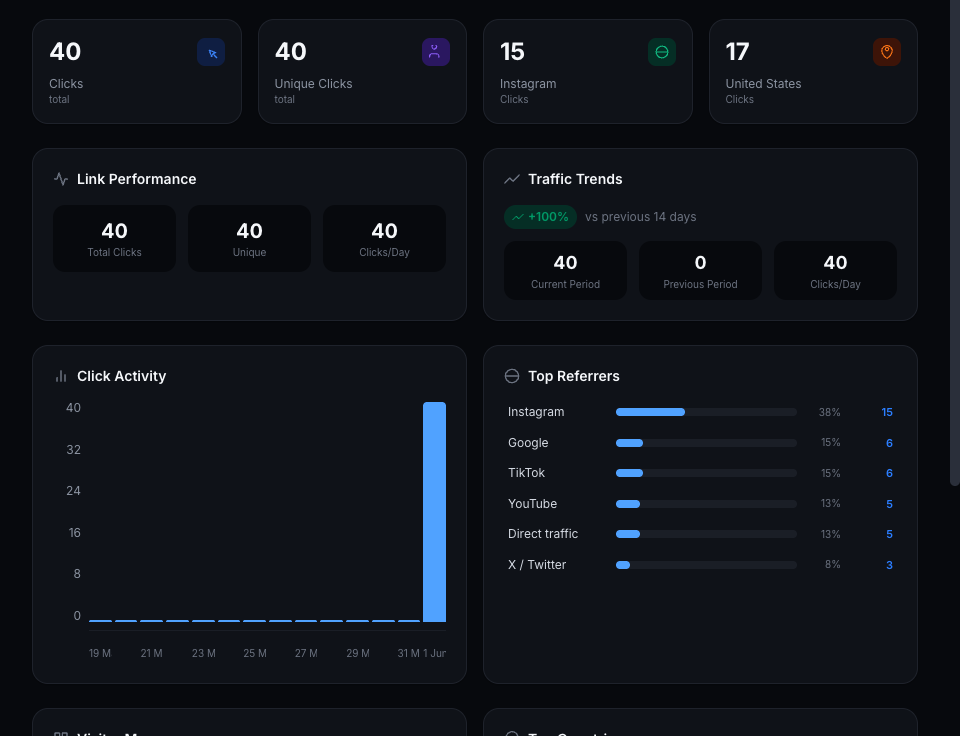
Richer analytics close that gap by attaching context to each click. When you can see the split between devices and operating systems, the referrers that sent the traffic, and the locations people clicked from, the story stops being a single number and starts being a diagnosis. A campaign that converts well on one platform and poorly on another is telling you something specific and actionable, rather than hiding inside a blended total.
This matters even more once app opens enter the picture. The whole promise of a smart link is that more taps reach the app where the action happens, and you want to be able to confirm that promise rather than take it on faith. Analytics that explain the click let you watch the improvement, spot the placements that still leak, and steadily move your effort toward the channels that pay you back.
The practical effect is that you make fewer decisions in the dark. Instead of guessing why a campaign underperformed, you can point to the device mix, the referrer, or a placement that clearly needs attention. Over a few campaigns, that clarity is worth more than any single clever post, because it compounds into a marketing habit grounded in what actually happens after the tap.

QR codes deserve smart routing too
QR codes have quietly become one of the most important bridges between the physical world and your digital destinations. They appear on packaging, posters, menus, business cards, event signage, and product inserts, and every scan is a person who took a deliberate action with their phone already in their hand. That makes a scan one of the highest-intent clicks you can earn, which is exactly why it is a shame to waste it on a plain redirect.
When a QR code points to an ordinary short link, the scan inherits all the same routing problems as any other mobile tap. It can dump the scanner into a slow web view, log them out of the very shop or app you wanted them in, and add steps that a curious person in a cafe or a shop aisle will not bother to complete. The physical effort of scanning earned you their attention; poor routing then throws it away.
A QR code that points to a smart link treats that attention with the respect it deserves. The scan routes by device, opens the right app where possible, and falls back to a clean page where not, and it still records the scan so you know how your printed campaigns actually perform. Because the destination behind the code is something you control, you can also update where it points without reprinting a single poster, which turns a static printed asset into a flexible, measurable channel.
What to look for in a creator-friendly link tool
If you are evaluating a Bitly alternative, it helps to judge tools against the jobs you actually need done rather than the length of their feature lists. These are the capabilities that separate a simple shortener from a tool built for mobile-first creators and businesses.
App opening support
The link should try to open the right native app where possible, not just forward every click to the same browser URL and hope for the best.
Reliable fallback pages
When the app cannot open, the visitor should land somewhere useful and relevant instead of a broken, blank, or confusing page that ends the journey.
QR codes built in
You should be able to apply the same smart routing to posters, menus, packaging, events, and flyers, so physical and digital campaigns behave the same way.
Analytics that explain the click
You need to see which links, devices, referrers, and campaigns are working, not just a single click number with no context.
Editable destinations
You should be able to repoint a link after it is shared or printed, so a campaign can evolve without stranding the people who already have the link.
Branded short domains and the trust they buy
One feature short links popularised is the branded short domain, and it remains genuinely valuable, so a good smart link tool should support it rather than force you to choose. A branded domain means your links carry your own name instead of a generic shortener's. Before anyone taps, they can see that the link belongs to you, and that recognition measurably increases the share of people willing to click.
Trust is fragile on mobile, where people are rightly wary of links that could lead anywhere. A familiar branded domain is a small, constant reassurance that the destination is legitimate and that you stand behind it. Across thousands of impressions, that reassurance adds up to real clicks you would otherwise lose to hesitation.
The ideal setup combines both layers: a branded domain for recognition on the surface, and smart routing underneath so the trusted-looking link also opens cleanly in the right app. You get the credibility of your own name and the conversion of app-aware routing at once, rather than trading one for the other.
Moving from a plain shortener without breaking links
If you already rely on a traditional shortener, the prospect of switching can feel risky, because links live in places you cannot easily edit: old captions, printed materials, other people's posts, and followers' saved notes. The good news is that moving to smart links does not require a disruptive cut-over. You can adopt them gradually and protect everything you have already shared.
The simplest approach is to use smart links for everything new while leaving existing links untouched, then upgrade your most important evergreen destinations over time. Because a smart link is just a link, anywhere you currently paste a short URL you can paste a smart one instead, with no change to your workflow beyond where the link comes from.
The principle to hold onto throughout is that a link you control should never lead to a dead end. If a destination changes, repoint the link rather than abandoning it. That way the QR code on last year's packaging and the URL in an old video description keep working, and you carry your audience forward instead of quietly losing the ones who held onto an older link.
Why ForceLink is built for mobile-first clicks
ForceLink gives creators and businesses a clean link that is still smart behind the scenes. On the surface it behaves like any short link you can share in a bio, a caption, a DM, an email, or a QR code. Underneath, it handles the work that a plain shortener ignores: device-aware routing, sensible fallbacks, built-in QR codes, and analytics that describe what actually happened after the tap.
That combination means you do not have to choose between simplicity and performance. Your links stay short and shareable, and your audience gets the app-opening experience that mobile users now expect by default. You manage one link, reuse it everywhere, and let it make the right routing decision on every individual tap.
Just as importantly, you keep visibility into the results. Because every click is routed and recorded with context, you can see which campaigns and placements move people forward, and you can improve the next one with evidence instead of guesswork. It is the tidiness of a short link with the conversion focus of a tool designed for how people really browse today.
Common mistakes when relying on plain short links
Treating a click count as success
Clicks measure interest, not outcomes. If you optimise for clicks alone, you can celebrate a campaign that actually converted poorly because the link routed people badly.
Ignoring the mobile context
A link that works on your desktop tells you little about how it behaves inside a social app on a follower's phone, which is where most of your taps really happen.
Skipping the fallback decision
If you never decide where people go when the app cannot open, the default is often a poor page. A deliberate fallback is part of a healthy link.
Using disposable links everywhere
Scattering one-off URLs you cannot edit later makes campaigns impossible to fix and analytics impossible to read. Treat important links as assets you keep.
Does smarter routing slow the click down?
A reasonable worry when you first hear about app-aware routing is that adding a decision step must make the click slower. It is a fair question, because nobody wants to trade a clean experience for a laggy one, and speed genuinely matters on mobile where patience is thin. The honest answer is that a well-built smart link adds only a tiny, near-instant routing step that most people never perceive as a delay at all.
In practice, the perceived experience is usually faster, not slower, because of what the routing step prevents. The slow part of a poorly routed click is not the redirect itself. It is the heavy web page that loads in an in-app browser, the login screen that appears because the session did not carry over, and the manual effort of finding and opening the right app afterwards. A smart link skips that whole detour by going straight to the app, so the person arrives sooner even though a routing decision happened along the way.
It also helps to remember what the alternative actually costs. A plain link that feels instant but lands in the wrong place has not saved anyone time. It has simply moved the delay to after the tap, where the person now has to recover on their own, and many will not bother. Measured by how quickly someone reaches the thing they wanted, app-aware routing tends to win comfortably.
The goal, as always, is the destination experience rather than the redirect speed in isolation. A click that resolves in a blink into a logged-out browser page is worse than a click that takes a fraction longer and opens the app ready to act. Optimising for the felt journey, not just the first millisecond, is what separates links that convert from links that merely feel fast.
Why teams and agencies benefit even more
Everything that makes smart links useful for a solo creator is amplified when more than one person is involved. Agencies, small marketing teams, and brands with several collaborators all share a common problem: links get created in a hurry, scattered across accounts and documents, and nobody can quite reconstruct which link went where or how it performed. A consistent smart link system replaces that sprawl with something everyone can rely on.
When links are managed in one place with clear purposes, anyone on the team can reuse the right link without guessing or accidentally minting a duplicate. The person scheduling social posts, the one running ads, and the one printing event materials all reach for the same well-routed link, which means the audience gets a consistent experience no matter who set up the campaign. That consistency is hard to achieve with a pile of disposable URLs.
Shared analytics is the other big win. When every click is routed and recorded with context, the whole team reads the same numbers and argues from the same evidence. Instead of one person's gut feeling against another's, decisions about budget, channels, and creative rest on a clear view of what actually converted. For an agency reporting to clients, that clarity is not just convenient; it is the difference between a confident recommendation and a hopeful guess.
Finally, ownership and editability protect the team from churn and change. Because the links are assets the organisation controls, a campaign can be repointed, a destination can be updated, and a departing team member does not take a tangle of untraceable URLs with them. The system outlives any single campaign or person, which is exactly what you want from infrastructure that your marketing depends on.
Putting it all together
A Bitly alternative is not really about finding a different way to shorten a URL. It is about recognising that, for a mobile-first audience, shortening is only half the job. The link also has to route the tap to the right place and tell you what happened, and a tool that stops at shortening leaves both of those needs unmet.
Smart links keep everything you like about short links, the tidy appearance, the branded domain, the basic shareability, and add the routing and analytics that turn taps into outcomes. You do not have to give anything up to gain the app-opening experience your audience expects, and you can migrate at a pace that never strands a link you already shared.
If most of your clicks come from phones, start by upgrading your single most important link to a smart link this week, watch how it performs against the plain version, and let the evidence guide the rest. The clicks you recover were never a content problem. They were a routing problem all along, and routing is the part you can fix today.
Try it before you sign up
Create a temporary smart link.
Test ForceLink with one demo link. It is limited to 3 clicks so you can see the app-opening flow before creating an account.
FAQ
Is ForceLink a Bitly replacement?
ForceLink can replace a normal short link when you need app-aware routing, QR codes, and clearer analytics. If you only ever need a short URL for desktop sharing, a simple shortener may be enough, but most creators sharing to a mobile audience need the routing job done too.
What is the difference between shortening and routing?
Shortening changes how a link looks: shorter, branded, and tidier. Routing decides where the tap actually goes and how cleanly it gets there. A plain shortener does the first and leaves the second to chance, while a smart link does both.
Can I use a branded short domain with ForceLink?
Yes. Branded domains are valuable because people recognise the link before they tap it, which increases the share of people willing to click. You can combine a branded domain with smart routing so the trusted-looking link also opens in the right app.
Why do creators need app opens?
Creators usually want followers, views, saves, comments, listens, subscriptions, bookings, or purchases. Those actions almost always happen best inside the app where the user is already logged in, not in a stripped-down in-app browser where they appear signed out.
Do QR codes work with smart links?
Yes, and it is one of the best uses. A QR code can point to a smart link so every scan gets device-aware routing and is recorded for analytics. Because you control the destination, you can also update where the code points without reprinting anything.
Will switching break the short links I have already shared?
Not if you migrate gradually. You can use smart links for new campaigns while existing links keep working, and upgrade important evergreen links over time. The key habit is never letting a link you control lead to a dead end.
Do I lose click tracking if I move away from a basic shortener?
No, you gain more. Instead of just a click count, you get clicks with context such as device, operating system, referrer, and location, which explains why a campaign performed the way it did rather than just how many taps it received.
Is this only useful for large creators?
Not at all. Small creators and local businesses often benefit most, because every click is hard-won. Making sure each tap opens cleanly and that scans from a poster or menu route properly can matter more at a small scale than at a large one.
What is the best Bitly alternative for app opens?
The best Bitly alternative for app opens is a smart link tool that keeps short, branded URLs while adding device-aware routing, fallback pages, built-in QR codes, and analytics. ForceLink is designed around exactly that combination, so your links stay tidy and still open in the right app on mobile.
Are smart links better than Bitly for Instagram and TikTok?
For Instagram and TikTok specifically, smart links tend to outperform plain short links, because most taps there happen inside in-app browsers that handle app hand-off poorly. App-aware routing is built to win more of those mobile opens and to fall back gracefully when an app cannot launch.
Can I keep my existing short links and add smart routing?
Yes. You can keep using your current links and adopt smart links for new campaigns, then upgrade your most important evergreen links over time. There is no need for a disruptive cut-over, and the key habit is making sure any link you control always resolves to something useful.